Chord is a monophonic synth program for the original Nintendo Game Boy. The idea was to make something that can be played like an instrument, but with the limitations of the few buttons available. No extra accessories. No midi keyboards.
You build “chords” of five notes and play them back using the pulsewave channel, with full sound register settings control and optional arpeggiator.
Sebastian Mihai is somewhat we would call a restless coder, with the love for multiple platforms. His latest work is a simple game for Playstation 1. The 11th Power is Sebastian’s take on the 2048 game, except it uses colored balls to represent exponents, rather than writing numbers out.
To all interested into coding for PSX: The source code is entirely available!
ZXDS is an emulator of Sinclair ZX Spectrum for Nintendo DS, written by Patrik Rak. It is steadily reaching a mature stage of development, and it already has some noteworthy features, like accurate emulation of Spectrum 48k, 128k and Pentagon models (including sound), or support for TAP/TZX/PZX tape files, TRD/SCL disk files and RZX playback files.
Changes:
ZXDS 1.3.2 (22.11.2014)
* Fixed libfat bug which could make corrupt directory entry after the last entry was deleted. You might have experienced this mostly when renaming files or moving them around.
* Fixed couple more libfat bugs (really long names, alias creation, whitespace trimming).
* Added caseinfo extension to libfat so letter case of 8.3 names is now read properly.
* Medium associated with persistent copy of save slot 0 is never deleted prematurely anymore.
* Save slot medium removal is now postponed to further improve chance of media reuse.
* Few other subtle changes (cache filenames, file name trimming, minor help tweaks).
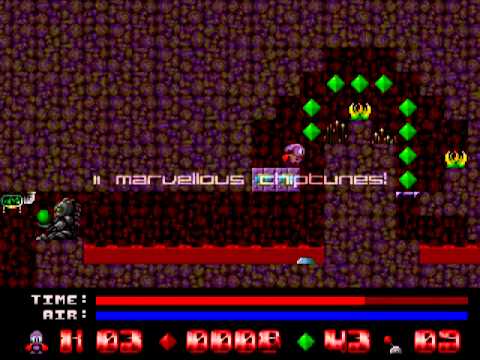
Sqrxz 2 by Retroguru is a Jump’n’Run which requires a sharp mind and fast reflexes, high frustration is guaranteed. Original Sqrxz made by Marcus Vesterlund (Maze) and John Holmvall (Hojo). Sqrxz 2 is a sequel to this game created by Rodolphe Boixel (Thor), Shahzad Sahaib (Kojote), Alexander Wiklund, Simon Butler and Jane Mumford (Jayne). Wii Port port is courtesy of Oibaf.
Story:
Another day another journey… As living on planet earth and its surrounding solar system seemed boring Sqrxz decided to check out another location in the universe. Just in case and to be extra careful he took a pocketful of emeralds with him to keep him in ready cash, but after starting his exciting journey he realized all his emeralds are suddenly missing! Retracing his steps Sqrxz notices mysterious creatures popping up all over the place to hinder him in his search! Oh what troublesome days… Help poor Sqrxz get back all his emeralds!
🛡️ Click to play — activates YouTube and transfers data to Google.
Features:
* Tough challenging gameplay – Extremely difficult; not for weaklings!
* Retro graphics!
* Hidden passages to discover!
* 10 tricky n’ hard levels!
* 11 marvelous chiptunes!
* Top 10 highscore!
* Infinite continue mode, which you will need badly in order to practise! 🙂
Newton Voyage by Sebastian Mihai is a simple game where you must maneuver your ship before you lose control of it, with the purpose of reaching the goal. There are various planets whose gravity affects your ship. Thanks to Sebastian himself for the news.
UAE Wii by Oibaf is a port of the famous Amiga emulator UAE and is based on the source code of E-UAE. The port uses SDL Wii.
Changes:
* Update to E-UAE 0.8.29 (more compatibility)
* Added 320X240 resolution (more emulation speed)
* Added hardfile and Virtual File System support in the GUI
* Amiga colors for GUI, added borders to the windows
* Set sound frequency to 48k
* Small bug fixes
Sqrxz requires fast reflexes and is a simply mindblasting Jump’n’Run puzzle game with high frustration factor. Now ported to Wii by Oibaf!
Storyline:
While Sqrxz wandered around on a sunny day, he was unaware that he had lost all his items while enjoying the scenery. It was already dark until he recognized the loss. There was no possibility, but to go back where he started the trip and save his things. If the loss was not already enough, strange creatures appeared. Will they be helpful?
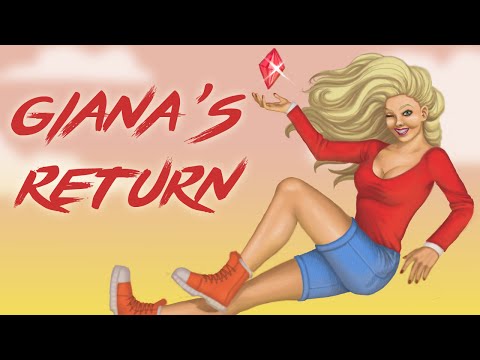
Giana’s Return aims to be a worthy UNOFFICIAL sequel of “The Great Giana Sisters” and has been recently released for Nintendo Wii. If you do have the homebrew channel at hand, you might want to check this release out.
🛡️ Click to play — activates YouTube and transfers data to Google.
Evil Swampy and his followers have stolen the magic ruby, which made it once possible for Giana and Maria to return from their dream. Many creatures are after this ruby, but does it really has power, or was it just a coincidence?As this is not bad enough, Swampy fell in love at first sight with Giana’s sister Maria and shamelessly kidnapped her. She simply has been at the wrong place at the wrong time.You will now have to take on the role of Giana and get back the magic ruby. And most important of all, save your beloved sister Maria and get home save!
In Wetspot 2 you control a small crab and your target is to kill every monster on the current level. Since you have no weapons, to accomplish your job you must use the same bricks that forms the walls of the level you are into.
🛡️ Click to play — activates YouTube and transfers data to Google.

.png)
_(psx_game).png)
.png)

.png)
_(psp_game).jpg)
.png)
.jpg)
_(gcw_game_port).gif)
